Multi-language code runner · Desktop & web

Run JS, TS,Python, Go, and Rustin one Monaco window.

Lingua is the playground senior developers reach for when they want to throw a 10-line script at five languages without spinning up a project. Desktop-first, source-available, and plain about what runs where.

5runnable languages
31developer utilities
0telemetry before consent

No install — runs in your browserView on GitHub

  • Node runtime on desktop — require() your project node_modules.
  • Local-first AI — explain errors, apply fixes, opt-in and BYO-key.
  • Pyodide vendored — Python runs offline.
const sizes = [512, 1024, 4096];
const kib = sizes.map((n) => n >> 10);
console.log(kib);

Why Lingua

Everything here you can verify before you trust the install.

Five languages, one binary

JavaScript, TypeScript, Python, Go, and Rust live inside the same Monaco-powered window. No project scaffold to test an idea.

Python that runs without the internet

Pyodide v0.29.4 ships inside the desktop binary. Open Lingua on a plane, write Python, hit run. The web build does the same after the first load.

Real Node, not a sandbox toy

Switch a JS or TS tab to the desktop Node runtime and you get the real thing: fs, path, http, and require() of every package already in your project node_modules. Lingua spawns Node directly — never through a shell — with an allow-listed environment.

Telemetry off by default

Nothing leaves your machine until you opt in. We never transmit your code. Read the privacy page — it says exactly what we collect when you do turn it on.

Execution history with diffs

Past runs stay close to the editor, so a quick scratchpad can still show what changed between attempts.

Shipped in Lingua

Four product workflows, shown in the app.

Every feature below is already available and works in the free tier. Full release history lives in the changelog.

Smart-paste toast offering to open a pasted JWT in the JWT Debugger

Paste a value, open the right tool

Paste a JWT, UUID, color, Unix timestamp, cron expression, or Base64 into the editor and Lingua offers to open it pre-loaded in the matching developer utility. Conservative by design: code look-alikes stay silent.

Lingua in presenter mode: no sidebar, toolbar, or status bar, with enlarged editor font

Presenter mode

One keystroke (Cmd+Alt+P) hides the chrome and enlarges the fonts for demos, pairing, and screen recordings. Toggle again and your exact layout comes back — it never touches your saved preferences.

Run button showing a live megabyte counter while the Python runtime downloads

Watch your runtime arrive

The first Python or Ruby run no longer sits on a static loading line: the run button streams a live MB counter while the WASM runtime downloads, on any network.

Read the full changelog →

Every release before this one

A steady record of local-first progress. Expand any version for its highlights.

  1. v0.14.0Jul 23, 20265 features
    • Windows joins the desktop release matrix:v0.14.0 produces a validated x64 NSIS installer alongside macOS arm64/x64 and Linux AppImage artifacts, with GitHub Releases as the canonical download and auto-update source. Authenticode is verified when signing is configured; otherwise the release records Windows as unsigned preview quality.
    • License verification now supports overlap-safe Ed25519 key rotation:web, desktop, and the license service accept an ordered public-key ring while the service keeps explicit current/next signing slots, so keys can rotate without invalidating existing offline licenses.
    • Production browser licensing works from app.linguacode.dev:activation, trials, education, recovery, and device management now pass the Worker's closed CORS allowlist without allowing arbitrary origins.
    • Settings and SQL import controls keep their intended layout:the Settings dialog heading and native SQL file input are visually hidden again instead of consuming visible layout space.
    • Production dependency advisories are cleared for 0.14.0the desktop updater now resolves the patched js-yaml line, legacy Electron tooling stays within advisory-fixed brace-expansion majors, the license Worker and marketing website use patched production dependencies, and CI/release audit every independently locked production graph instead of checking only the app root.
  2. v0.13.0Jul 19, 20268 features
    • Explain selected codePro users can send an explicit editor selection to the configured bring-your-own AI endpoint from the editor or Command Palette, review the exact redacted payload before transmission, stream the explanation, and continue with follow-up questions.
    • HTTP response assertionsHTTP requests can define status, header, JSON-path, body-contains, and latency checks; results appear beside the response and are persisted with the request for repeatable API validation.
    • Actionable workspace empty statesHTTP and SQL now offer direct create/import actions instead of passive blank panels, reducing the path from opening a workspace to a first useful request or query.
    • Developer Utilities are easier to navigatethe launcher groups the full utility catalog by purpose while preserving fuzzy search, favorites, keyboard navigation, and lazy panel loading.
    • The website reflects current product breadthcomparison pages, browser CTAs, trust evidence, release architecture labels, and the public roadmap now describe shipped behavior without exposing private planning metadata.
    • Monaco language support loads more selectivelybasic-language tokenizers use a typed, exhaustive lazy-loader registry so a misspelled language identifier fails at compile time instead of silently degrading highlighting.
    • Immediate HTTP Send preserves assertions and capturessending before the autosave debounce completes now builds and persists the request from all current editor state instead of dropping recently edited arrays.
    • HTTP and SQL panels remain usable at common laptop heightstheir resizable workspaces use the intended three-column layout, preventing response controls from overlapping or intercepting clicks when the bottom console is open.
  3. v0.12.0Jul 16, 202614 features
    • Magic comments are now discoverable in the editortyping // @ (or # @ in Python) offers completions for the real magic-comment vocabulary — @watch, //=> arrows, @timeout, @time, and the presentation directives — each with localized hover documentation, so the inline-results language no longer lives only in the docs.
    • What's New stopped interruptingafter an update, instead of auto-opening the full release-notes overlay, Lingua shows a one-line upgrade notice once per version with a button to read the notes — and a persisted opt-out for people who never want the nudge.
    • Rotating hints on empty surfacesthe empty Console and the Command Palette now surface one of twenty curated tips per session. Hints are platform-aware (web never suggests desktop-only features), can be dismissed for good with one click, and can be re-enabled from Settings → General.
    • Live download progress while Python or Ruby bootsthe first run on a fresh session used to sit on a static "Loading Python runtime (Pyodide)..." line while tens of megabytes downloaded. The run button now shows the live byte counter ("Loading Python runtime (Pyodide)... 34 MB / 60 MB") whether the boot started from a manual run or the scratchpad auto-run, and falls back to a loaded-only counter when the server sends no Content-Length. Failures keep their honest local error message.
    • Presenter mode (Cmd+Alt+P)one toggle for demos, pairing, and screen recordings — hides the sidebar, toolbar, action pill, and status bar while lifting the editor font by 4px and the console output by 2px. Toggling again (same shortcut, or the Toggle presenter mode palette action) restores your exact previous layout, because the mode never touches your saved preferences — even a reload mid-presentation leaves them intact.
    • Inline per-line timing for JavaScript and TypeScriptadd a // @time comment (or enable Settings → Editor → Show per-line timing) and every top-level statement shows its wall-clock duration inline at the right edge of its line, with the slowest statement of the run highlighted red. Timings survive errors — statements that completed before a throw keep their measurements, and the failing statement reports how long it ran. Off by default; debug runs are never instrumented.
    • Cmd+; opens your recent commandsLingua now keeps a per-session stack of the palette commands you execute. Press Cmd+; (Ctrl+; on Windows/Linux) to reopen the last eight — numbered 1-8 for one-keystroke re-runs, with relative timestamps — so repeating "that command I just ran" no longer needs the open-palette → retype → select roundtrip. The stack lives only in memory and clears on reload.
    • Smart paste now recognizes utility valuespasting a JWT, UUID, color (#hex / rgb() / hsl()), Unix timestamp, cron expression, Base64 text, or a JSON snippet into the editor offers a one-click Open in the matching utility action that opens the right Developer Utility with the value pre-loaded (a pasted Base64 value even lands in decode mode). Detection is deliberately conservative — existing share-link/capsule/cURL/stack-trace/JSON importers always win, code look-alikes like 5 * 60 * 1000 or hex hashes stay silent, and the same Smart paste toggle and Cmd+Shift+V bypass apply.
    • Share a run as a single HTML fileRun Capsules gain an Export as HTML action — in Settings → Account → Run capsules for the latest run and as a per-capsule row action in the capsule browser — that saves one self-contained .html document with the executed code (statically syntax-colored), stdin/arguments, stdout/stderr, status, duration, and environment metadata. The file opens in any browser with zero network requests (no scripts, and a default-src 'none' Content-Security-Policy backstop), declares the capsule schema version, and is localized to the app language. Desktop uses the native Save dialog; web downloads the file.
    • Positive offline statusthe status bar now celebrates offline operation with a localized Offline — everything keeps working segment, disappears automatically when connectivity returns, and explains that local and cached runtimes remain available while updates, remote AI, and uncached runtime downloads pause. The desktop status bar now also honors the real Electron platform values and is enabled by default as intended.
    • Actionable native-toolchain recoverywhen Go, Rust, desktop Node, or explicitly selected system Ruby is unavailable, Lingua now shows a localized warning with an installation guide and a live detection retry. Installing the toolchain during the session is picked up without restarting the app; Ruby automatic mode keeps its quiet WASM fallback.
    • Live Browser preview refreshJavaScript and TypeScript tabs in Browser preview mode now refresh the sandboxed iframe 300 ms after typing stops, with Off and 1-second choices in Settings → Editor plus a first-line // @preview-refresh off|300|1000 override. Silent refreshes stay out of execution history, preserve the last successful DOM when new code fails, and show their effective interval in the preview footer.
    • TypeScript and Python Recipesthe practice library now includes three curated TypeScript recipes and three Python recipes, with language filters, matching .ts/.py tabs, localized prompts and hints, and real Run + Test execution through each web worker. Recipe assertions keep their results isolated from run history and the Result panel while coordinating with scratchpad auto-run so a test pass is not interrupted after editing.
    • Notebook edit-request CI stabilitythe animation-frame-deferred command-to-edit transition test now synchronizes with the frame itself instead of depending on a one-second polling window that could expire under the full Linux test load.
  4. v0.11.0Jul 14, 202622 features
    • Run Ledger — query your own run history with SQLan opt-in, local history of your manual runs, stored in the same DuckDB database the SQL workspace uses (schema lingua_ledger), so you can run code and then query your own history with the product's own SQL surface. Off by default; when enabled it stores only a SHA-256 content hash of the source (never the code itself) plus stdout previews taken from redacted-by-design run capsules and capped at 2 KiB. The ledger tables are deliberately visible in the schema browser — querying, editing, or dropping them is your right, and the ledger recreates itself on the next recorded run. Free keeps 7 days of runs; paid tiers keep everything. Clear drops the whole schema and Export downloads every table as JSON; both the toggle and Clear are logged to the Privacy trust feed. Durability follows the SQL workspace's OPFS persistence opt-in — without it the ledger is session-only, and the Settings card says so. Enable it in Settings → Account → Run Ledger.
    • SQL Column Explorera successful SELECT (or WITH … SELECT) in the SQL workspace gains a Profile columns action that opens a side panel with per-column type, null percentage, approximate cardinality, min, max, average, and standard deviation — computed locally through DuckDB's SUMMARIZE. Lazy by design: it only runs on an explicit click, never automatically, and never adds a run-history or ledger entry.
    • Named Input Sets (per-tab stdin + argv)save named combinations of the stdin buffer and command-line arguments on an editor tab and switch between them, so a tab can carry a "happy path" and an "empty input" fixture side by side. Input Sets round-trip through Run Capsules.
    • Renderer telemetry has one typed React entry pointthe shell, runner hook, dependency detection, smart paste, onboarding, console, dependency installer, and Developer Utilities now emit through a stable useTelemetry() tracker. Consent, redaction, and wire payloads are unchanged, while a compile guard and a decreasing legacy-call baseline prevent new stringly direct callers.
    • License-service compatibility now fails closedevery machine-readable license and trial response carries protocol version 1, and both the web and desktop clients validate that envelope before reading status or entitlement fields. Missing, malformed, or future versions clear the untrusted token and show a localized update notice instead of falling back to local verification.
    • The pay-once Pro tier is now a perpetual entitlementthe $59 one-time purchase unlocks the paid tier forever with 12 months of included updates, replacing the previous "every future update included" promise with a sustainable model. Your paid features never expire — a build published after your included-updates window shows a non-blocking optional-renewal notice, never a lockout. The offline Ed25519 verifier keeps a pay-once Pro token active regardless of its update-window date (revocation stays authoritative through the license server when the app can sync), and the product-id family check was tightened so a look-alike token signed with the same key is rejected. Public pricing, licensing, and purchase/recovery email copy are updated to match.
    • Free tier now opens three editor tabsthe Free editor budget rises from one tab to three, with the License upsell appearing when you open a fourth.
    • Utilities workspace is more readable and compactepoch timestamps render as highlighted chips whose hover shows local time, UTC, and ISO 8601 (and the Timestamp panel gains a UTC output card); the JWT token is segment-colored (header / payload / signature) inside the real input, with a signature-status pill beside the label; pinned favorites open even when the active search filter would exclude them; visited panels stay mounted while the Utilities tab is open, so in-progress input survives navigating between tools (and is discarded when the tab closes); the workspace-local header implementation detail into the shared editor chips row (copy-output hint + tool counter); and JSON outputs gain syntax coloring.
    • Faster, calmer startupLingua now paints a theme-matched editor skeleton while the renderer bundle loads instead of showing an empty window. On desktop, license verification runs in parallel after its IPC channels are registered, so opening the window no longer waits on disk/token initialization and the license surface shows a neutral verifying state until the real snapshot arrives.
    • Settings editor internals are easier to maintainthe SQL workspace defaults and persistence actions now live in their own focused settings component, reducing the parent editor-settings surface below the maintainability threshold without changing controls, copy, persistence, or DuckDB behavior.
    • Utility pipeline internals are easier to maintainthe persisted library/import controls and streaming results now live in focused components, reducing the pipeline orchestrator below the maintainability threshold without changing its controls, shortcuts, persistence, execution, or capsule behavior.
    • HTTP request editor internals are easier to maintainrequest-builder tabs and their params, auth, headers, body, and capture panels now live in a focused component, reducing the request orchestrator below the maintainability threshold without changing auto-save, environment resolution, clipboard masking, sending, or cancellation behavior.
    • Settings navigation internals are easier to maintainthe rail UI and its filter metadata now live in focused modules, reducing the modal shell below the maintainability threshold without changing tabs, shortcuts, filtering, focus movement, or settings content.
    • Console internals are easier to maintainANSI parsing and collapsed-entry rendering now live in a focused row component, reducing the console orchestrator below the maintainability threshold without changing filtering, windowing, source-line pulses, rich output, or image-paste behavior.
    • SQL workspace internals are easier to maintainthe keyboard-operable data-import toolbar now lives in a focused component, reducing the workspace orchestrator below the maintainability threshold without changing file acceptance, busy states, input reset, schema refresh, or query behavior.
    • Scratchpad auto-run internals are easier to maintaininput decisions, execution orchestration, and result publication now live in focused modules, reducing the React hook below its maintainability threshold without changing debouncing, workflow gates, stale-run protection, inline results, console output, telemetry, or runtime timeouts.
    • Import overlay internals are easier to maintainsource detection, Postman variable re-previewing, and confirmed store writes now live in focused modules, reducing the React hook below its maintainability threshold without changing supported formats, lossy warnings, telemetry, notebook restoration, collection requests, or cancellation behavior.
    • Global shortcut internals are easier to maintaincatalog matching, action dispatch, debugger gates, and utility clipboard behavior now live in focused modules, reducing the React hook below its maintainability threshold without changing bindings, overrides, overlay handling, debugger controls, or utility feedback.
    • Project watcher internals are easier to maintainevent coalescing, external-reload prompts, and stale-tab detection now live in focused modules, reducing the React hook below its maintainability threshold without changing debounce timing, scoped tree refreshes, dirty-buffer confirmation, batching, or watcher cleanup.
    • Utility transform internals are easier to maintainBase64 and URL now share one input/transform/output-registration cycle plus a common encode/decode toggle, with automated size and single-registration guards, without changing live conversion, Apply, history, copy shortcuts, or invalid-input behavior.
    • Boot timings now cover the real startup boundarythe initial performance mark is emitted by the static document before the renderer module downloads or evaluates, so Copy boot timings includes bundle evaluation and import-time persistence work instead of starting after it. A capped-payload audit found no meaningful first-paint win from deferring notebook or utility-history hydration, so Lingua keeps immediate workspace access rather than adding a new loading interval.
    • Native execution probes no longer block the Electron main threadNode and Ruby toolchain discovery, project/module lookup, dependency detection, and the guarded Windows npm-launcher search now use asynchronous filesystem APIs while preserving the same fallbacks and security checks.
  5. v0.10.0Jul 6, 20269 features
    • Deno and Bun runtimes (desktop)the per-tab runtime picker (Worker / Node / Browser preview) gains Deno and Bun for JS/TS. Deno runs sandboxed with filesystem read scoped to the run's temp directory; both render as a disabled, actionable option when the binary is not detected on PATH.
    • Offline "Explain last error"a command-palette action that turns the most recent run error into a plain-language explanation plus concrete fix hints — entirely local, no network, no model, no code leaving the machine. A zero-config, private complement to the bring-your-own-key AI explainer; same Pro entitlement.
    • Benchmark a taba "Benchmark this tab" command runs the active file through a warmup plus repeated timed runs and reports timing statistics. Pro.
    • Install native dependencies (Go / Rust / Ruby)the dependency panel can install detected Go / Rust / Ruby packages on desktop via the toolchain (go get / cargo add / bundle add) — spawned with no shell and an argv array, specifiers validated against flag-injection and path-traversal, and only against an existing go.mod / Cargo.toml / Gemfile.
    • Native runners share one spawn enginethe Node, Ruby and Rust runners now route their child-process execution through a single spawnNativeRun helper (no-shell spawn, POSIX process-group leadership, SIGTERM→SIGKILL escalation, whole-tree kill, output byte caps, and the opt-in stdin write with its EPIPE guard). Behavior-preserving internal refactor; the Go compiler stays on its own execFile timeout path. (Internal; no user-facing behavior change.)
    • Python debugger — desktop engine (groundwork)the desktop build gains a main-process Python debugger engine (src/main/pythonDebugger.ts) that drives a headless python -u -m pdb subprocess — set breakpoints, continue, step over/into/out, evaluate expressions, and structured { file, line, func } pause events (with the source line when pdb prints it), parsed from pdb's REPL. Python runs in Pyodide/WASM (no pdb), so debugging is desktop-only and needs host python3. The IPC bridge + renderer debugger UI (breakpoint gutter, step toolbar, variables panel) are a following slice; no user-facing behavior yet.
    • HTTP workspace — desktop SSRF-guarded proxy engine (groundwork)the desktop build gains a main-process HTTP engine (src/main/httpProxy.ts) that can bypass the browser CORS constraint while resolving every hop's host and refusing loopback / link-local / RFC 1918 / CGNAT / unique-local / multicast targets (an opt-in toggle relaxes this for private hosts), restricting schemes to http/https, re-guarding each redirect up to a hop cap, and dropping credential headers (Authorization / Cookie / Proxy-Authorization) when a redirect crosses origins — mirroring the browser it replaces so a public->public bounce cannot exfiltrate the user's token. It mirrors the existing response envelope byte-for-byte. The renderer transport seam + desktop Settings toggle that switch the workspace onto this engine are a following slice; no user-facing behavior change yet.
    • Interactive stdin + cloud-sync engines (groundwork)the Node/Ruby runners can keep stdin open for later writes (*:stdin-write / *:stdin-close) and stream live output over IPC, and a last-write-wins cloud-sync merge engine ships behind an injected transport. The REPL UI and a real sync transport are following slices; no user-facing behavior yet.
    • Supply-chain: the exotic git @electron/node-gyp subdependency is gone, and blockExoticSubdeps is back on.@electron/rebuild (via electron-forge) declared @electron/node-gyp as a codeload.github.com git-tarball dependency, which forced the pnpm exotic-subdependency guard off. The fork now publishes to the npm registry, so it is pinned to the registry release and the git tarball is removed from the lockfile — with the guard re-enabled, a future git/tarball subdependency now fails the install instead of being silently pulled.
  6. v0.9.0Jul 5, 202643 features
    • Notebook — Python cells share a kernelPython cells in a notebook now run against one persistent Python kernel, so a later cell sees the imports, DataFrames, and functions an earlier cell defined — the notebook workflow you'd expect from Jupyter, instead of every cell starting from scratch. Each notebook gets its own kernel: notebook A can't see notebook B's variables, and neither sees the editor scratchpad. "Restart kernel" (and closing the notebook) clears it. Cross-notebook/editor isolation also closes a latent leak where all Python runs previously shared one global namespace.
    • Notebook — SQL cellsa notebook code cell can now be set to SQL. It runs on the same DuckDB-WASM engine as the SQL workspace and renders its result set as a table (the same grid rich outputs use). Because the engine is shared, a table you CREATE in one SQL cell is visible to later SQL cells and to the SQL workspace, so you can build up a query across cells. DDL/DML statements show a short status line instead of a table, and query errors surface inline on the cell. SQL is a notebook-only cell language — it does not turn SQL into a general editor file type.
    • AI assistance — "Explain this error" (bring your own key)a paid, opt-in AI feature. Add your own OpenAI-compatible endpoint + API key + model in Settings → AI (stored locally only — never in exports, run capsules, share links, or telemetry). When something errors, an "Explain this error" action opens a dialog that shows you the exact payload first — nothing is sent until you choose Send — with obvious secrets redacted from the code excerpt. The trigger appears wherever an error surfaces: a notebook code cell, the editor console (using the active tab's source), a failed SQL query, and a failed HTTP request. The answer renders as formatted text — prose, lists, and copy-ready code blocks so a suggested fix is one click to grab — instead of raw Markdown. Lingua ships no default key or endpoint and makes no background calls. On the web build, requests are subject to your endpoint's CORS policy; desktop reaches local AI servers directly.
    • AI assistance — Apply & re-runwhen the AI answer proposes code, one click applies it — behind a full diff preview showing exactly which lines change, because replacing your code is the one thing that should never happen blind. Confirming replaces the failing code and re-runs it immediately, closing the loop: error → explain → apply → green. Works on notebook cells, the editor console (active tab), and failed SQL queries; the HTTP surface has no code to patch and offers no apply.
    • SQL workspace — Ask AI (natural language → SQL)an "Ask AI" button in the query editor turns a plain-English request ("top 5 customers by total spent") into a DuckDB query. The only context sent is the live schema — table and column names + types, never rows or data values — and the consent preview shows that exact payload as you type. The generated SQL is inserted into the editor for you to review and run yourself; it never auto-runs.
    • AI assistance — streaming answers, follow-up questions, runtime-aware fixes, one-click Ollama setupthe explanation now streams in word by word instead of holding a spinner until the full answer lands — with a local model you see text in about a second, and a long answer that keeps flowing is never cut off (the timeout only fires when the stream stalls). After an answer you can ask follow-up questions in the same conversation; each send is still explicit, and the visible transcript is exactly what gets sent. The prompt now tells the model where your code actually ran — Pyodide, a sandboxed worker, desktop Node, DuckDB-WASM, the native Go/Rust toolchain — so it stops suggesting fixes your runtime can't execute (no more pip install advice inside a browser Python). And Settings → AI gains "Detect local AI (Ollama)": one click finds your local server, fills the endpoint, and lists your installed models to pick from. The desktop app's network policy now allows loopback (localhost) AI servers — the private, local-first path; remote endpoints on desktop still wait for the guarded proxy.
    • Notebook — tabular outputs render as a tablea code cell whose output is a homogeneous JSON array of objects (a terminal array expression, console.log([{…}]), or a Python print of a JSON list) now renders as a real table grid instead of raw JSON text, mirroring the console's auto-table. Same grid the console Details popover uses.
    • HTTP workspace — capture variables (request chaining)a new Capture tab on the request editor saves a value from a successful response — a JSON body path (data.token), a response header, or the status code — into a variable of the active environment, so the next request can reference it as {{VARIABLE}}. This turns the workspace into a real chaining client (log in → capture the token → call an authenticated endpoint). Captured variables whose name looks like a secret are marked secret by default, so they stay redacted in run capsules and exports.
    • HTTP workspace — Copy as codethe request's Copy button is now a "Copy as…" menu that generates a runnable snippet in cURL, JavaScript fetch, JavaScript axios, or Python requests, matching the exact wire request (composed headers + injected auth + default Content-Type). Environment secrets stay as {{placeholders}}, never resolved into the clipboard — same guarantee as Copy as cURL.
    • SQL workspace — column-aware schema browser + autocompletethe schema browser now expands each table to list its columns with SQL types, and the query editor's autocomplete offers column names (typed detail, de-duplicated across tables) alongside table names and keywords. Introspection is a single information_schema.columns probe per refresh instead of one PRAGMA table_info per table.
    • SQL workspace — export results to a filethe result toolbar gains an "Export…" menu that downloads the current result as a CSV, JSON, or Markdown file. It writes exactly the rows on screen (the same filtered/sorted/capped view Copy uses) and, when the result is truncated to a preview, the confirmation says so — the natural path for a result too large to paste.
    • Accessibility overhaulA sweep across the app brings full keyboard operability and screen-reader support — roving arrow-key navigation and ARIA semantics for the file tree, editor tab strip, command palette, quick-open, recipes, and capsule-comparison surfaces; focus management and traps for the guided tour, overlays, menus, and the execution-history popover; live-region announcements for console run summaries, project-search results, and other dynamic state; and a reduced-motion guard that quiets non-essential animation for people who prefer it.
    • Safer destructive actionsIrreversible operations — file and implementation detail delete, pipeline delete, remove license, keymap and theme import overwrite, and replace-in-files — now route through a shared confirmation dialog, and recoverable deletes (snippets, capsules, clear console) offer an Undo toast that restores the item in place. The web file delete, previously unconfirmed, now always asks first.
    • Import data files as DuckDB tablesLoad CSV, JSON, and Parquet files directly into the SQL workspace as queryable tables.
    • Typed IPC contractthe entire preload↔main boundary now derives from a single source of truth (src/shared/ipcContract.ts). The preload bridge routes through typed helpers (typedInvoke / typedSend / typedOn) instead of hand-written as Promise<X> casts, and main handlers register through typedHandle, which binds each handler's return type to the contract. A renamed channel or drifted payload is now a compile error, and a drift test keeps the contract in lockstep with the registered handlers. (Internal refactor; no user-facing behavior change.)
    • Build-time env wiring is now gated in CIthe four-source env cascade for main-process defines lives in one shared helper (build/resolveEnv.mts), and a new drift test fails when a __LINGUA_*__ define is consumed by a surface whose Vite config never provides it, or when envDir drifts off the repo root — the class of regression behind the no-public-key production incident, previously only catchable with a manual packaged-build audit. (Internal; no user-facing behavior change.)
    • License IPC handlers join the typed contractthe renderer's ambient license tier type was widened to the full canonical six (free / pro / pro_lifetime / team / trial / education) so it matches the shared source of truth, which let the five license:* main handlers move onto typedHandle (return types now compile-checked against the contract) and closed the last documented exception in the typed-IPC boundary. Gating is unchanged — entitlements are free-vs-paid, so the two newly-typed tiers resolve to paid. (Internal; no user-facing behavior change.)
    • Desktop packaging and auto-updateDesktop builds now ship through electron-builder as native installers for every platform — macOS (signed and notarized .dmg / .zip), Windows (NSIS installer), and Linux (AppImage) — and auto-update through GitHub Releases. Linux desktop builds auto-update for the first time.
    • Large notebooks stay responsiveThe notebook cell list is windowed, so a notebook with hundreds of cells mounts only the rows near the viewport while preserving scroll position and the row count screen readers announce.
    • License tokens are bound to the Lingua product.The verifier shape-checked productId but never bound it, so a token minted for a different product under the same signing key would satisfy validation and grant Lingua entitlements. Tokens must now carry a lingua-family productId; a foreign product id is rejected.
    • Web CSP: dropped the unused wss: from connect-src.Nothing in the web bundle opens a WebSocket, so an arbitrary-origin wss: allowance was pure attack surface with no consumer; it is removed. The broad https: stays and is now documented in the CSP as a deliberate product exception — the web HTTP workspace exists to fetch user-specified HTTPS endpoints, so its origins cannot be enumerated in an allowlist (plain http: remains blocked).
    • HTTP workspace: API keys under a custom header name no longer leak into shared capsules.An apiKey auth with a non-baseline header name (e.g. X-Custom-Auth) had its value written in clear into run capsules / share-links / CLI replay; the capsule serializer now redacts the auth-injected header unconditionally.
    • Git read-only layer no longer escapes the filesystem sandboxthe git:status / git:diff handlers now gate each requested file — not just the repo root — against the approved-scope containment check and the filesystem denylist, so a compromised renderer can no longer read unversioned files (.env, secrets in sibling packages) outside the approved subtree in the monorepo case.
    • License-server URL must be HTTPSa misconfigured LINGUA_LICENSE_SERVER_URL can no longer send the signed license token over cleartext HTTP; only https: (and loopback for development) is accepted.
    • Native-runner env hardeningdynamic-loader injection keys (LD_PRELOAD, DYLD_INSERT_LIBRARIES, NODE_OPTIONS, …) are stripped from the user-supplied env tier as defense in depth; PATH stays allowed.
    • SQL workspace — the WASM engine survives a flaky CDNthe web build fetches the ~38 MiB DuckDB runtime from the R2 mirror (it exceeds Cloudflare Pages' 25 MiB per-file cap), and a transient 503/network blip on that single fetch used to fail the whole engine with "Could not load the SQL engine". The runtime fetch now retries transient 5xx/network errors with exponential backoff (a deterministic 4xx like a bot-mitigation 403 is not retried). The durable fix — edge-caching the immutable runtime prefix so R2 is barely touched — is documented in docs/runbooks/r2-release-mirror-setup.md.
    • HTTP workspaceediting the URL bar no longer deletes disabled ("commented out") query-param rows; you can now cancel an in-flight request (Send becomes Stop); and a stale settle can no longer clobber a newer request's execution state (per-request tracking).
    • SQL workspacethe table browser + autocomplete now populate on open and refresh after a schema change (with OPFS persistence, tables from a previous session were invisible until a manual Refresh); Copy CSV/JSON/Markdown now copies exactly the filtered/sorted rows shown in the grid instead of the full raw result; and a name collision on import is reported honestly instead of as a generic "parse error".
    • Notebook workspaceediting a markdown cell no longer serializes every notebook to storage on each keystroke (debounced like code cells), which also stops re-rendering sibling cells while you type.
    • Notebooks: re-running a JS/TS cell no longer throwsIdentifier 'x' has already been declared. Sandbox pull-ins now skip names the cell itself re-declares at top level.
    • File watcher no longer crashes the appan asynchronous FSWatcher error (e.g. deleting the watched implementation detail on Windows) is caught and surfaced as a degraded-watcher notice instead of taking down the main process.
    • File watchers no longer leaka project watcher is disposed when its window is closed (macOS keeps the app alive) or the renderer reloads, instead of surviving to the next session.
    • Language serversrestarting rust-analyzer / gopls no longer spawns a duplicate orphaned server, and stopping one no longer emits an unhandled promise rejection.
    • Dependency installcancelling or timing out npm install now terminates the whole process tree (node-gyp, postinstall) instead of leaving orphaned builds holding node_modules locks.
    • License (web)removing a license during an in-flight revalidation no longer silently resurrects it, including across browser tabs.
    • Editorkeystrokes typed while a save is in flight are no longer discarded; double-clicking a file in the tree no longer opens it twice.
    • Replace in files"Replace all" freezes the confirmed query/replacement, so editing the inputs while the queue drains can no longer rewrite the remaining files with a half-typed search.
    • Native runnersa failed temp-file write no longer leaks the temp directory or escapes as a raw IPC rejection.
    • Window closea crashed renderer no longer leaves the window (and the updater's install-on-quit) blocked forever.
    • Lighter app-shell bootMonaco (~3.8 MB / ~987 KB gzip) is no longer executed as part of the shell startup path — the LSP lifecycle hook and the Git diff panel now load it on demand, so it runs with the editor/diff surface that needs it instead of before the shell paints (and not at all on non-editor web surfaces).
    • Faster typingthe app shell no longer re-renders on every keystroke (the LSP, Git-status, auto-run, and dependency-detection hooks were subscribing to the whole tab list).
    • Faster native runsGo and Rust toolchain detection is cached per session, saving one to two process spawns per run.
    • Editor tab strip no longer re-renders every row on each keystrokeeach tab row is memoized, so typing in the active file re-renders only that tab's row (its Git status pill, glyph, and status dot) instead of the whole strip — the win grows with the number of open tabs.
  7. v0.8.0Jun 26, 202612 features
    • HTTP + SQL workspaceA full-screen HTTP request workspace — reusable environments with secret-aware {{variable}} interpolation (URL, headers, and the auth tab), name-based header redaction in history and exports, cURL import, and each response captured as a run capsule — plus a DuckDB-WASM SQL workspace with a Monaco SQL editor (syntax highlighting, schema autocomplete, run-selection) and opt-in OPFS table persistence so tables survive a reload.
    • Notebooks grow upCell-based notebooks now run TypeScript and Python cells, share variables across cells for real, edit code in a Monaco editor (only the focused cell mounts an editor, so a 200-cell notebook stays responsive), and export/import losslessly to the native .linguanb document as well as Jupyter .ipynb.
    • Compare two run capsulesA side-by-side capsule diff shows Code, Input, and Output differences between two saved runs.
    • Importers — PostmanImport a Postman collection and have its collection-level and environment/globals {{variables}} resolve into runnable requests (with secret-named values redacted in the preview), instead of landing as literal placeholders.
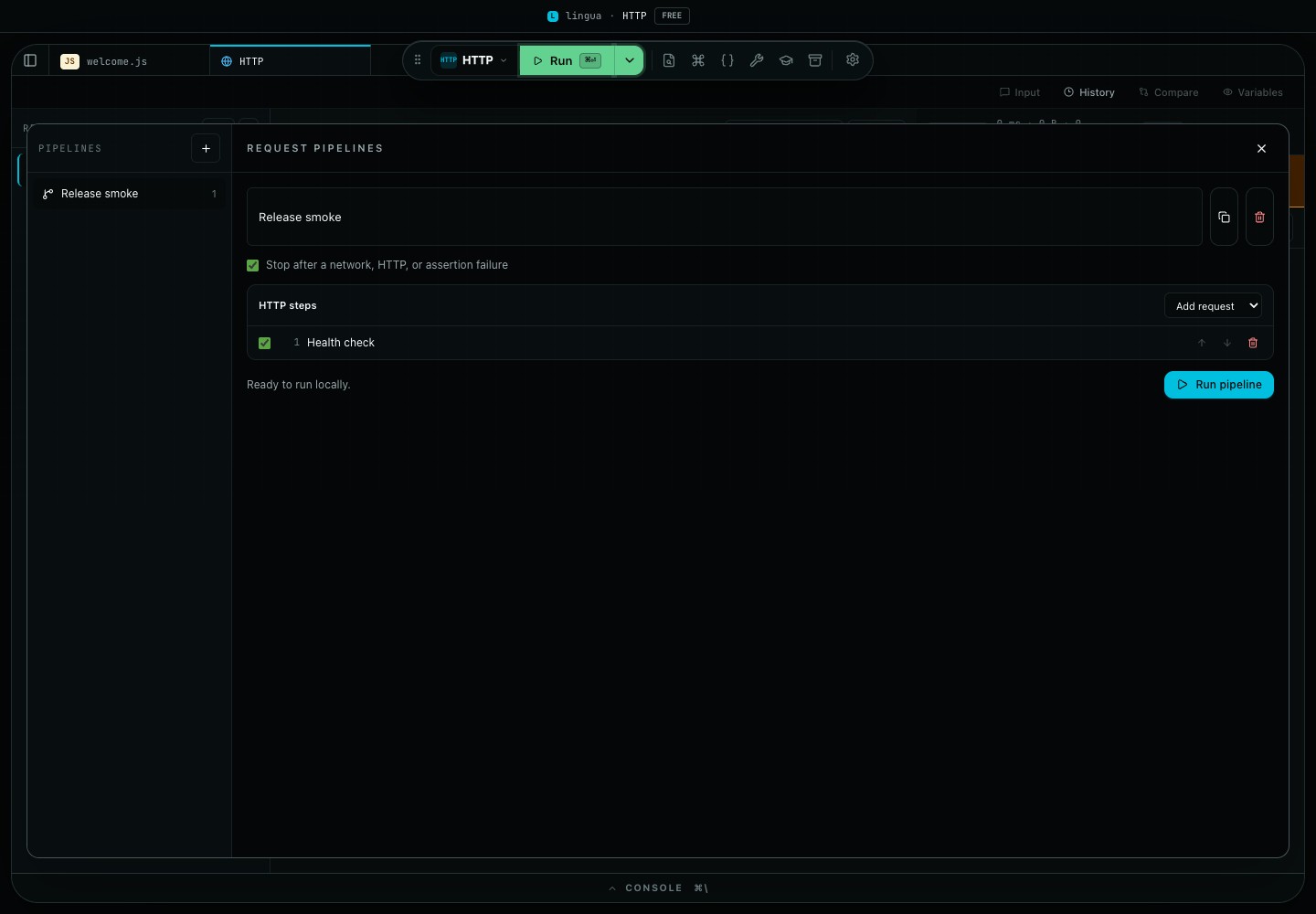
    • Utility pipelinesChain utility adapters into a saved, one-click workflow — the adapter vocabulary grew to 23, with a starter template gallery and the ability to save a pipeline run as a capsule. Single-shot utilities stay free; pipelines are Pro.
    • Persistent status barA bottom status bar surfaces language, lint error/warning counts, cursor position, indentation, the Git branch, and run status, with click-throughs to the next problem.
    • Privacy + Trust dashboardSettings → Privacy now captures live trust events from the capsule-export, share-link, update-check, telemetry, and license surfaces, with per-feature "last network call" timestamps and a sensitivity-filtered activity feed.
    • Language scorecard per platformA Web | Desktop filter resolves each language capability for the selected platform, with per-platform Markdown export.
    • Paste images into the consolePaste a screenshot into the console; an oversized image is downscaled to fit instead of being rejected.
    • Design systemClosed the type, radius, shadow, and color scales across the UI for a more consistent surface.
    • Node.js is found across version managersA packaged app launched from Finder/Dock inherits a minimal PATH, so a shell-managed Node (fnm, nvm, Volta, asdf, mise, nodenv, nodebrew) or a system install was invisible and every run reported "Node.js is not installed". Detection now probes the PATH first, then known version-manager and system install locations on macOS, Linux, and Windows. Snippets that use import or top-level await run as ES modules, and the editor resolves Node built-in types (crypto, fs, …) so they no longer show a spurious "cannot find module" error.
    • Console Details popover no longer clippedThe rich-output Details popover (table / object / array / chart / image / HTML) now portals to the document body, so it centers and scrolls instead of collapsing inside the console strip.
  8. v0.7.0Jun 14, 202612 features
    • Smart pastePasting a Lingua share link, a run capsule, a cURL command, a stack trace, or a large JSON document into the editor now offers a one-click import through a non-blocking toast — open the share link or capsule, turn the cURL into a request in the HTTP workspace, or drop a large blob into a JSON tab — instead of landing as raw text. Cmd+Shift+V always pastes as plain text (also available as a "Paste as plain text" command), and a Settings → Editor toggle turns detection off entirely.
    • Inline lint and quick-fixesJavaScript and TypeScript now surface problems as you type, toggleable per language in Settings → Editor. A built-in rule flags loose equality (== / !=) with a one-keystroke fix to the strict form, and quick-fixes can add a missing semicolon or wrap a selection in try/catch — alongside the editor's existing type diagnostics.
    • Reopen your last sessionLingua can bring back the tabs from your previous session on startup. Choose never, ask each time (the new default), or always from Settings → Editor; an "ask" prompt and a command-palette action let you restore on demand without auto-reopening private code after a screen share.
    • Notarized release gateThe macOS release workflow now fails closed when a build is signed but not notarized and stapled (xcrun stapler validate plus a Gatekeeper spctl assessment), and a release-time guard rejects any macOS update package whose filename the update feed cannot resolve — closing the gap that previously stranded macOS auto-update. The full update signature chain (manifest to installer to on-disk binary) is now documented in docs/RELEASE_SECURITY.md.
    • Git layer joins the filesystem sandboxThe read-only git integration now only operates on repositories that intersect the folder you have explicitly opened (including the repository root above a monorepo subfolder); arbitrary paths are refused, aligning git with the capability sandbox the rest of the filesystem already enforces.
    • Verified web runtimesThe standalone web build now verifies the sha256 of the Ruby and DuckDB WebAssembly runtimes fetched from the download mirror before instantiating them, and the web deployment ships hardening response headers (no sniffing, no framing, no referrer leakage).
    • Sandboxed HTML output locked downRich HTML console payloads now carry the same no-network Content-Security-Policy as the browser preview, both app shells gain base-uri/form-action CSP directives, and preview messages are validated against a closed per-type shape before rendering.
    • Rust compiles as edition 2021Run and format-on-save now agree on the Rust edition — modern syntax (async, dyn, current into_iter() semantics) compiles instead of failing with edition-2015 errors.
    • Lua can no longer freeze the appAn infinite Lua loop now stops at the execution deadline with the standard timed-out message instead of permanently freezing the window, and unbounded print output is capped like every other language.
    • Stopping runs kills the whole process treeTiming out or stopping a Node, Ruby, or Rust run now terminates any child processes the code spawned (with SIGKILL escalation), instead of leaving them running in the background.
    • Appearance theme buttons apply real presetsThe Settings → Appearance theme buttons now switch the shell/editor to genuine presets instead of behaving as no-ops.
    • Faster startupThe TypeScript transpiler (esbuild) now loads on the first TypeScript or Node-mode run instead of at boot, Go programs transfer their compiled WebAssembly to the worker without an intermediate copy, closed Rust tabs release their editor models, and the workspace session auto-save now re-arms only when the persisted snapshot actually changes instead of on every transient editor mutation.
  9. v0.6.0Jun 8, 20267 features
    • Free developer utilitiesEvery single-shot developer utility (JSON, Base64, URL, UUID, hash, timestamp, JWT, color, diff, beautify/minify, regex, and the rest) is now available on the Free tier. The advanced utility *workflows* — multi-step pipelines, history that persists across reloads, and clipboard-on-focus automation — remain Pro, each with an in-app unlock prompt.
    • Deny-by-default desktop permissionsThe desktop shell now refuses Electron permission requests (camera, microphone, geolocation, and the like) by default, granting only the narrow clipboard access the app actually uses.
    • Faster startup and large-session performanceMonaco language providers and the developer-utility panels now load lazily, the console de-renders large output sessions (store-side collapse plus list windowing), and the project file-watcher refreshes only the directories that actually changed instead of re-walking the whole tree on every event.
    • Safer persisted dataThe settings, license, and project stores are now schema-versioned with a migration registry, so upgrading across versions rehydrates saved state cleanly instead of dropping or corrupting it.
    • Branded filesystem capability idsRoot, watch, and relative-path tokens are now nominally distinct types, turning an accidental capability swap at the IPC boundary into a compile-time error rather than a runtime confusion.
    • Worker trust boundaryThe JavaScript worker's AsyncFunction execution path is documented and regression-tested to confirm that Node-only globals (process, require) stay unreachable from user code.
    • macOS automatic updatesThe update server now resolves the actual macOS release asset (the Lingua-darwin-<arch>-<version>.zip that electron-forge publishes), so packaged macOS builds receive updates again. Previously the server only matched a differently-ordered name, returned "no update," and silently stranded macOS users on the installed version. A regression test now locks the forge asset-name contract.
  10. v0.5.0May 31, 202626 features
    • Signal-Slate redesignA workspace-wide redesign pass that lands the new notebook surface, tightens the editor chrome, and implementation detail in broad platform hardening across the renderer. The visual language carries forward from Signal-Slate v2 while the workspace layout, panels, and notebook entry points are rebuilt around it.
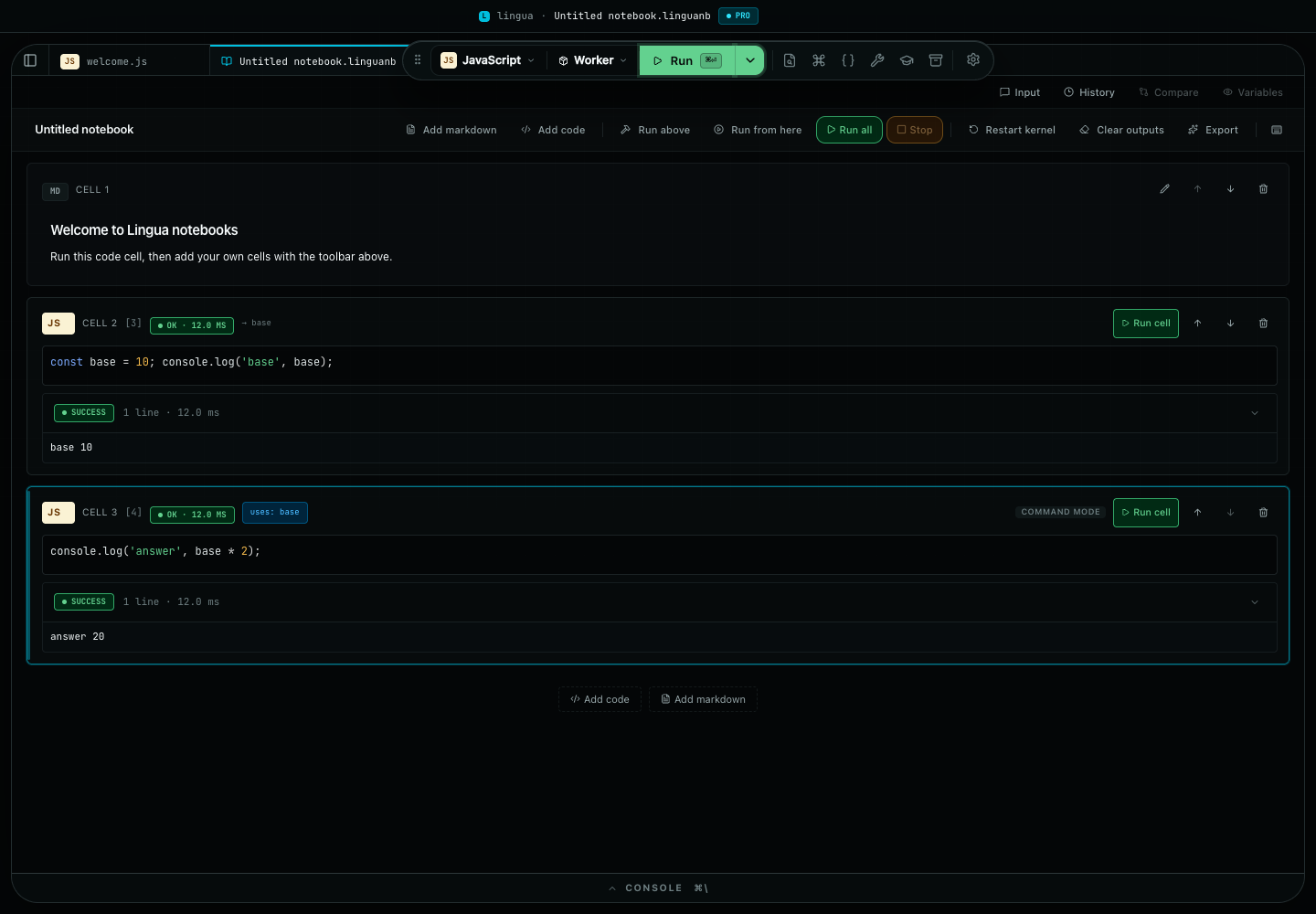
    • Notebook workspaceA literate, multi-cell notebook surface — ordered code and prose cells in one document — with one-step import of existing Jupyter .ipynb notebooks into native Lingua notebooks.
    • SQL and HTTP workspacesA dedicated SQL workspace for ad-hoc querying and a full HTTP workspace for composing, sending, and inspecting requests, including import of Postman and Bruno collections.
    • Recipe practice libraryA built-in library of runnable recipes for guided practice, with a run panel wired into the editor.
    • Run capsulesPortable, self-contained snapshots of a run (code plus inputs plus settings). Export a capsule, share it, and re-import it through paste, file picker, or drag-drop — all three load surfaces converge on a single shared parseRunCapsule validator. Includes a capsule browse overlay and an import-preview overlay.
    • Project bundle export and importPack an entire project into a portable .zip (isomorphic fflate, lingua-bundle.json manifest) and import it back through one zip-slip-guarded validation chokepoint with file-count, size, and zip-bomb caps. Export excludes node_modules/.git/dist/build; Mod+Alt+E, a FileTree button, and two command-palette actions drive it.
    • No-backend share linksShare a scratchpad as a self-contained link that gzips its payload into the URL fragment — no server round-trip, nothing leaves the device until you paste the link.
    • CLI companionA lingua command-line companion for driving the toolchain outside the desktop shell.
    • Dependency managementA dependency detection panel plus install flows — JS packages and Python via Pyodide micropip on the web build.
    • Multi-file projects and cross-project replaceA multi-file project foundation with a find-and-replace workflow that spans every file in the project.
    • Utility pipelinesChain developer utilities so the output of one tool feeds the next.
    • Ruby supportA hybrid Ruby runtime and language support, extending the multi-language matrix.
    • Rich media and rich console outputInline chart rendering and a rich-media worker bridge for the console, Python rich-media parity, rich console payloads, and output source-mapping badges that trace each line back to its origin.
    • Onboarding choreographyA staged onboarding flow with status-notice priority so first-run guidance never collides with other notices.
    • Privacy and trust dashboard, language scorecardA Settings dashboard surfacing privacy and trust posture, and a per-language support scorecard.
    • Git read-only layerA read-only git surface with head refresh and reload notices, alongside a Settings cleanup that retired 11 Tier-S toggles.
    • Console image pastePaste images directly into the console.
    • Workflow canvas gatingThe workflow canvas is now scoped to builder tabs on the web build.
    • Toolchain migration to pnpmAll three projects (desktop app, update-server, license-server) moved from npm to pnpm, with the operational docs swept to match. The worker projects bumped to TypeScript 6 and Vitest 4; inline charts now render on Vega 6 / Vega-Lite 6 / Vega-Embed 7.
    • Performance baselinesWeb and desktop renderer footprint budgets rebaselined after the new features landed.
    • Update state across pollingDesktop now preserves downloaded-update state across the polling cycle instead of dropping it between checks.
    • Update-server cachingThe GitHub API fetch cache is capped at 60 seconds and 204 responses are no longer cached, so update checks stop serving stale data.
    • Output source mappingTightened the gates that decide when an output line earns a source badge.
    • R2 release mirrorPass --copy-props none so the mirror sync stops tripping over GetObjectTagging.
    • Patched tmp across the toolchainForced tmp 0.2.7 across the dev toolchain to clear the advisory.
    • Hardened GitHub ActionsPinned every GitHub Actions step to a commit SHA and added least-privilege permissions and concurrency groups across the workflows.
  11. v0.4.0May 18, 202611 features
    • Scratchpad excellenceA complete closeout for the JS / TS / Python Scratchpad workflow. Per-tab Run / Debug / Scratchpad mode toggle with the Run mode disabling auto-run for compiled languages. Smart auto-run completion gate so the runner waits for a coherent edit before firing. Pinned // @watch <expr> and # @watch <expr> annotations that survive across runs. Per-tab recent-runs replay with one-click rerun (Mod+Shift+H) and a Pro-gated <RecentRunsPill> in the result header (Free tier sees an upsell variant). Opt-in bare-expression auto-log mode for JS / TS with per-language Settings defaults and per-tab overrides. Pre-set stdin buffer with a dedicated bottom-panel Input tab consumed by prompt() / readline() (JS / TS) and input() (Python), with a "Used N of M lines" pill after the run. Per-language execution timeout presets (quick / normal / long / extended) with optional live mm:ss countdown pill and a // @timeout 60s magic-comment override. Compare-with-last-stable-run toggle in the result header with a multi-snapshot ring, pin/freeze support, three diff granularities (line / word / character), and inline + / − / ~ diff badges. Post-execute variable inspector panel mutually exclusive with Compare, surfacing typed previews for primitives, objects, arrays, Maps, Sets, errors, dates, and functions with Mod+Shift+I toggle, optional recursive expansion, and a case-insensitive name filter.
    • Explicit JS / TS runtime modesPer-tab runtime selector with three implemented modes. Worker (default) keeps the existing fast Web-Worker scratchpad path. Browser Preview ships an iframe-sandboxed runtime with srcdoc CSP, runId-anchored postMessage bridge, parent-owned timeout, scoped multi-file preview seed, and an inspect-in-window button — useful for HTML / DOM / canvas demos. Desktop Node spawns a real node child process with a parent-owned SIGTERM→SIGKILL timeout, a NODE_TOOLCHAIN_KEYS env allowlist, automatic node_modules/ cwd resolution, package.json#type === 'module' detection, and a first-run trust notice before the first execution touches your filesystem and network.
    • Signal-Slate v2 chromeNew 36px header row above the toolbar with app mark, filename + unsaved dot, license badge, command-palette search, and settings gear. Toolbar trimmed of the seven right-side icons that duplicated the new header. Variables panel can now dock to a Variables tab in the bottom panel (Settings → Editor → Variable inspector surface) instead of the floating card. Toolbar chips (Lang / Runtime / Workflow) stay clickable even without an open tab and auto-create the right tab on demand so the toolbar can never deadlock the user out of a fresh session.
    • Rich-output foundation + //=> table directiveNew RichOutputPayload type discriminator (superset of ScopeValue) covering map / set / date / promise / table / rawText payloads, with image and chart stubs reserved for a follow-up implementation. JS / TS runners attach a typed RichOutputTable payload when the user annotates an expression with //=> table — the inline pill upgrades from a JSON blob to a compact Table(N×M) — cols summary. Python's #=> table is recognised by the parser even though the Pyodide runner does not emit the payload yet. Foundation for the upcoming console-panel widget, popover surface, and chart / image / sandboxed-HTML rendering.
    • Debugger UX refinementsBreakpoint controls consolidated inside the debugger panel for a cleaner gutter, clearer affordances around the active debug session and the bottom-panel tab strip.
    • Public R2 release mirrorThe release workflow now mirrors desktop installers, checksums, SBOM, and the third-party license report to a Cloudflare R2 bucket served at downloads.linguacode.dev. This is the public download surface for marketing-site CTAs while the source repository stays private. Includes a root manifest.json for programmatic discovery, a latest/ prefix that always points at the current release, a check:r2-mirror parity validator, and per-release evidence under output/r2-mirror-validation/<tag>.json. Setup runbook: docs/runbooks/r2-release-mirror-setup.md.
    • Telemetry export pipelineNew infrastructure path for periodic export of the closed-enum telemetry buffer to the update-server, enabling downstream analytics + observability without the renderer talking to a third-party service.
    • Toolchain modernizationVite 5 → 8 (Rolldown default), Vitest 3 → 4, ESLint 9 → 10, eslint-plugin-react-hooks 5 → 7, Electron 41 → 42, TypeScript 5 → 6, Pyodide 0.26 → 0.29, esbuild-wasm 0.27 → 0.28, Node engine moved to the 24.x family (any Node 24.X.Y release), not a fixed patch. Held @electron/fuses at 1.8.0 because @electron-forge/plugin-fuses 7.11.1 still pins ^1.0.0; documented in tests/build/depFreshness.test.ts. Three lint rules surfaced by the bumps (no-useless-assignment, preserve-caught-error, react-hooks/purity) re-promoted from warn to error after fixing every violation; four others (set-state-in-effect, immutability, exhaustive-deps, refs) intentionally stay at warn because the existing call sites are intentional useEffect patterns whose refactor would be a design change.
    • Toolbar layoutToolbar no longer ships duplicated chrome (LicenseBadge, Open File, Quick Open, Palette, Snippets, Utilities, Console, Settings icons) — those moved to the Signal-Slate v2 header row. Left padding tightened to match.
    • Inline-pill overflow on long valuesStringified values longer than the editor's viewport used to paint past the right edge, wrap onto a second line, and overrun the gutter. Truncate at 80 characters with an ellipsis and surface the full text via the title attribute (visible on hover). The new //=> table directive side-steps this for array-of-objects entirely.
    • CompareResultsPanel purityRelative-time strings inside the compare panel were derived from Date.now() inline in render, causing churn on every re-render. Anchored to the snapshot's capturedAt instead so the render stays pure (re-enables the react-hooks/purity rule at error).
  12. v0.3.0May 11, 202616 features
    • Rich language intelligence for Python, Rust, and GoInline diagnostics, completions, hover documentation, and parameter hints. Rust uses rust-analyzer and Go uses gopls when installed locally; Python runs in-process. Web build keeps these languages in validate-only mode.
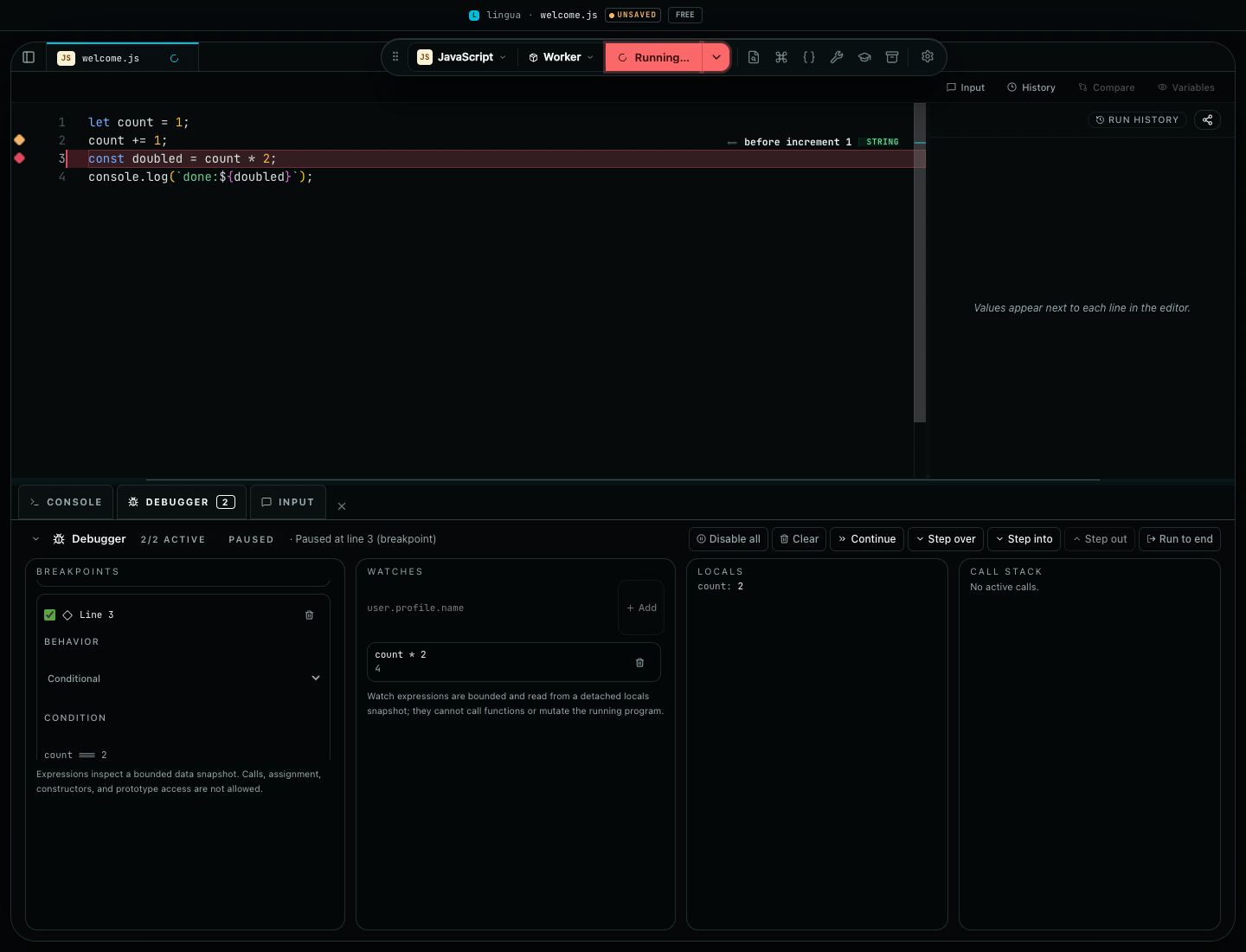
    • JS/TS debugger (preview)Click-to-toggle gutter breakpoints with Mod+Shift+B, a Debugger drawer with step controls, Settings entries to disable or clear all breakpoints, and TypeScript source-map composition so breakpoints stop at the line you authored.
    • Developer utilities productivity layerCmd/Ctrl+K launcher with fuzzy search, Cmd+Shift+C / Cmd+Alt+R to copy or replace utility output, per-tool history with persistence, drag-reorder favorites with full keyboard support, clipboard-on-focus consent, and Apply-from-input across 29 panels.
    • QR utility closeoutDrag-drop image decode, Copy-as-PNG, FG/BG color pickers with a WCAG-AA contrast guard, high-contrast preset, and SVG download.
    • Recovery experienceSafe-mode boot via ?safe-mode=1, automatic factory mode after repeated crashes, a Settings recovery section with five scoped resets, and a reveal-implementation detail shortcut.
    • Profile backup and restoreVersioned profile export and restore with explicit conflict handling, replace confirmation, and machine-bound data exclusions.
    • Performance visibilityRelease validation captures bundle size, runtime timings, and memory diagnostics before a build ships.
    • Release update feed gateDesktop release validation now includes a draft-channel update-feed check with archived evidence.
    • Public-source readiness guidanceRelease, security, auto-update, Cloudflare, performance, and source-available publication checks documented in one place.
    • Desktop watcher reliabilityWatcher diagnostics, opaque watch IDs, and degraded-event handling are documented and covered more directly.
    • Plugin hardeningBuilt-in plugin catalog and manifest validation reject malformed or prototype-derived ids more defensively.
    • Release validationPerformance budgets are part of the normal web-build quality gate.
    • Trust-boundary hardeningFilesystem capability checks and native runtime detection paths were tightened to keep host secrets out of subprocess environments.
    • Overlay accessibilityModal overlays preserve dialog boundaries, contain focus, and restore focus after close.
    • Auto-update docsRunbooks match the desktop updater's one-hour check interval.
    • Public-release secret scanA gitleaks scan now runs as part of release readiness.
  13. v0.2.3Apr 30, 20261 feature
    • Web build stabilityLifted the Node heap limit for the web build job so release builds stop failing from memory pressure.
  14. v0.2.2Apr 30, 20266 features
    • Public release hygieneAdded source-publication checklists, release security guidance, third-party notice reporting, and secret-scan configuration.
    • Offline Python runtime validationVendored Pyodide runtime assets with integrity checks so packaged desktop builds can prove Python runs without a CDN fallback.
    • Desktop release verificationAdded production dependency audit, checksum verification, SBOM generation, and packaged macOS smoke coverage.
    • Native execution trust boundaryGo and Rust execution now require explicit acknowledgement and use a filtered environment across detection and run paths.
    • Filesystem capability modelDesktop file access moved to root-token plus relative-path IPC contracts with protected-path enforcement.
    • Public web surfacesRepo docs now point to linguacode.dev and app.linguacode.dev as the live public surfaces.
  15. v0.2.1Apr 22, 202621 features
    • URL Parser(Developer Utilities): A new panel breaks any URL into scheme, origin, user, password, host, port, path, search, and fragment. Each component renders on its own card with a copy button, and the query string shows as a one-row-per-parameter table that preserves duplicate keys. The password cell stays masked until you explicitly reveal it.
    • String Case Converter(Developer Utilities): Type any phrase or identifier and see seven casings live: camelCase, PascalCase, snake_case, kebab-case, CONSTANT_CASE, Sentence case, and Title Case. The tokenizer understands acronyms (HTTPRequest → HTTP Request), letter-digit boundaries, and leaves CJK, emoji, and accented characters intact.
    • HTML Entity Encode / Decode(Developer Utilities): A new panel with four modes — Encode (minimal), Encode (named), Encode (numeric), and Decode. Named encoding covers Latin-1 Supplement plus common punctuation / symbol entities; codepoints outside the named table fall back to decimal numeric. Decode resolves named, decimal, and hex references and surfaces a small hint when any reference could not be resolved.
    • String Inspector(Developer Utilities): Paste any text to see its UTF-16 units, approximate graphemes, and UTF-8 byte length alongside a per-codepoint table that labels every character (printable, whitespace, control, invisible, BiDi). Warning cards call out zero-width characters, BiDi overrides, mixed-script words, and common Latin / Cyrillic homoglyphs — the usual suspects when a pasted string behaves mysteriously.
    • Diff Viewer granularityThe Diff Viewer now supports line-level, word-level, and character-level comparison via a selector at the top of the result. Word and character modes render inline so small edits pop visually, while the line summary keeps the familiar added / removed / unchanged counts.
    • More copy buttons across Developer UtilitiesThe UUID Generator, Timestamp Converter, JSON Formatter, and JWT Debugger now ship a dedicated copy affordance on every result — each generated UUID row, the four timestamp cards (Unix seconds, Unix milliseconds, ISO 8601, local time), the current JSON input, and the decoded JWT header and payload.
    • Backslash Escape / Unescape(Developer Utilities): Convert pasted strings for JavaScript, JSON, Python, or SQL-MySQL contexts, then unescape them back with clear inline errors when a sequence is incomplete or malformed.
    • Random String Generator(Developer Utilities): Generate one or many secure random strings with length, count, character-class toggles, and an option to exclude ambiguous characters such as 0, O, 1, and l.
    • Lorem Ipsum Generator(Developer Utilities): Generate placeholder copy as words, sentences, or paragraphs, with an optional classic opening and natural sentence rhythm for mockups, layout tests, and sample content.
    • Base64 Image Encode / Decode(Developer Utilities): Drop an image to create a data-URI, or paste a data-URI to preview it with MIME and size metadata. Oversized pasted payloads are rejected before preview so the app stays responsive.
    • JWT Debugger algorithm coverageVerify and sign JWTs across the full HS, RS, ES, and PS families, including RS384 and RS512, without leaving the local renderer.
    • Beautify / Minify expansion(Developer Utilities): The panel now covers JSON, JavaScript, HTML, CSS, SCSS, LESS, and XML. JavaScript minify uses a real ECMAScript minifier, while markup and stylesheet modes preserve raw text, strings, URLs, CDATA, and other sensitive content.
    • SVG to CSS converter(Developer Utilities): Paste SVG markup and copy either a Base64 or URL-encoded data-URI plus a ready-to-use CSS background-image block, with detected size hints when the SVG exposes safe dimensions.
    • Cron Parser(Developer Utilities): Explain cron expressions in plain language and list the next scheduled run times from your machine clock, with English and Spanish descriptions plus a configurable upcoming-runs count.
    • Hash Generator closeout(Developer Utilities): Adds MD5 via a lazy-loaded spark-md5 chunk, SHA-384, SHA-512, HMAC over the full SHA family, plus a drag-drop file input so local payloads up to 50 MB can be hashed without ever leaving the device.
    • HTML to JSX converter(Developer Utilities): Paste HTML markup and copy valid JSX with React-compatible attribute names, self-closing void elements, inline styles translated to object literals, HTML comments converted to JSX comments, and multi-root inputs optionally wrapped in a fragment.
    • cURL to Code converter(Developer Utilities): Paste common cURL commands and generate equivalent code for fetch (browser), undici (Node), Python requests, or Go net/http. Headers, methods, inline bodies, basic auth, and cookies all carry over; file-backed bodies get a clear error, and unknown flags surface as inline warnings instead of hard failures.
    • YAML and JSON converter(Developer Utilities): Convert between YAML and JSON with a 2 / 4-space indent toggle. A diagnostic flags when YAML comments are dropped at the JSON boundary; quoted-scalar # characters are correctly preserved.
    • JSON and CSV converter(Developer Utilities): RFC 4180-compliant CSV ↔ JSON-array converter with configurable delimiter (comma, tab, semicolon, pipe), header-row toggle, sparse-row support, and full quoted-field handling for embedded delimiters and newlines.
    • Markdown Preview(Developer Utilities): Render Markdown to a sanitized HTML preview locally — DOMPurify backstops the sanitization and remote <img src="…"> attributes are stripped before rendering so nothing leaves the renderer.
    • SQL Formatter(Developer Utilities): Format SQL with ANSI standard, PostgreSQL, or MySQL dialect rules. Configurable indent (2 / 4 spaces) and keyword case (preserve / UPPERCASE / lowercase).
  16. v0.2.0Apr 21, 202622 features
    • License managementA new License section in Settings lets you paste a Lingua token to unlock your plan. The current tier is visible next to the input, and a FREE / PRO pill in the toolbar shows your active plan at a glance. Click the pill to jump straight to the License section.
    • Environment variablesA new Settings section where you can define environment variables at the workspace or per-project level. Values stay on your machine and flow to desktop runners when you execute a file.
    • Expanded language catalogRuby, Java, Kotlin, Scala, Swift, C, and C++ files now open with proper syntax highlighting, file-extension detection, and a clear indicator in the file tree when they aren't runnable yet.
    • Privacy controlsA first-launch prompt asks whether you want to share anonymous usage signals before anything leaves your machine, and Settings → Privacy lets you change your mind at any time. Telemetry and crash reporting are off until you opt in, and never include your code or file paths.
    • About and What's NewSettings now ships a dedicated About panel with version and release links, plus a What's New overlay that surfaces these release notes without leaving the app.
    • Editable keyboard shortcutsRebind any built-in shortcut from the Keyboard Shortcuts overlay. Conflicts are detected and refused with a helpful notice, per-row and global reset restore the defaults, and your changes persist across sessions. Escape stays reserved so you can always close an overlay.
    • Keyboard shortcut presetsSwitch between "Default (Lingua)", "Sublime Text-inspired", and "Classic IDE (JetBrains-style)" bundles in one click. Any manual edit afterwards flips the selector back to Default so the UI always reflects the truth.
    • Export and import your keymapSave your personalised shortcuts to a JSON file or import one from another install. The file is validated for shape, version, and conflict-free combos before it is applied.
    • Theme packsSettings → Appearance adds a theme pack selector. Pick "Solarized Daylight" for warm paper light mode, "Nord Night" for a calm blue-grey dark mode, or stay on the Lingua default. A pack swaps appearance, typography, and layout in one move.
    • Guided tour on-startup toggleEvery step of the guided tour now has a "Don't show this tour on startup" checkbox. A matching switch lives in Settings → About for anyone who wants to replay or silence the tour on demand.
    • Execution history everywhereA new clock icon in the console toolbar opens a popover with your most recent runs — language, duration, and relative time — and the Command Palette surfaces the same list so you can re-run a recent file from the keyboard. Clear the history any time.
    • Number Base Converter(Developer Utilities): Convert integers between binary, octal, decimal, hexadecimal, or any custom base from 2 to 36. 0x, 0o, and 0b prefixes are honoured and underscores work as digit separators.
    • UUID v7 and ULID(Developer Utilities): Generate modern time-ordered identifiers alongside the classic UUID v4. A new decoder surfaces the embedded timestamp from any UUID v7 or ULID you paste.
    • Beautify / Minify panel(Developer Utilities): Pretty-print or compact JSON and JavaScript side-by-side. JSON round-trips through a parse and restringify; JavaScript gets an honest whitespace-only minifier with a clearly labelled hint.
    • Quick copy in Developer UtilitiesEvery result field in Developer Utilities — hex/RGB/HSL colors, hashes, Base64 output, URL encode/decode, Beautify / Minify results — now has a small copy icon that writes the value to the clipboard with a brief confirmation.
    • Format on save for PythonPython files now run through ruff (falling back to black) when format-on-save is enabled, alongside the existing support for JavaScript, TypeScript, JSON, CSS, Go, and Rust.
    • Support for infrastructure filesDockerfile, Containerfile, Makefile, .gitignore, .dockerignore, .npmignore, .editorconfig, and shell scripts (.sh, .bash, .zsh, plus common shell dotfiles) now open with proper syntax highlighting.
    • Inline validators with friendly diagnosticsRunning a JSON, YAML, .env, CSV, .editorconfig, Dockerfile, Makefile, .gitignore, or shell script file now surfaces lightweight warnings inline — duplicate .gitignore patterns, space-indented Makefile recipes, missing Dockerfile FROM or deprecated MAINTAINER, unknown EditorConfig keys, missing shebangs in shell scripts, and more.
    • Dark / Light togglePicking a shell theme always takes effect now. Previously the "match shell to editor theme" option could quietly override your choice.
    • Clearer license errorsInvalid tokens surface a tier-specific explanation — "malformed token", "signature does not match", "expired", "clock is off", and so on — rather than a generic fallback.
    • Color Converter pickerThe colour picker row now reads as a proper control, with a Palette icon and a hint line instead of an anonymous square.
    • Shortcut row spacingKeyboard Shortcuts rows keep clear breathing room between the combo and the Edit / Reset buttons in every language, including Spanish.
  17. v0.1.0Apr 16, 202610 features
    • Desktop code runner foundationElectron Forge + Vite + React 19 shell with Monaco editor, project explorer, command palette, quick open, snippets, settings, and a structured console panel.
    • Language execution backendsJavaScript, TypeScript, Go, Python, and Rust execution paths, with browser support for JS/TS/Python and desktop-only native toolchain flows for Go/Rust.
    • Inline execution feedbackResult panel, per-line inline output, runtime markers, execution timing, and magic-comment support for dynamic languages.
    • Project and file workflowsOpen implementation detail, recent projects, loose-file editing, save/save-as, rename, delete, duplicate tab, and session restore support.
    • Monaco authoring supportRuntime-aligned JavaScript/TypeScript diagnostics, file-extension language detection, and immediate completion providers for Go, Python, Rust, and Lua.
    • Localization and docsEnglish/Spanish UI, i18n validation tooling, architecture docs, renderer reference docs, and contributor guidance for the renderer surface.
    • Packaging and update infrastructureDesktop updater foundation, packaging metadata hardening, protocol registration, release checksums, and manual GitHub release workflows.
    • Renderer architectureSplit oversized modules into focused feature implementation detail for editor, file tree, command palette, settings, and project tree helpers.
    • Shell behaviorResponsive sidebar drawer, persistent resizable layouts, safer overlays over Electron drag regions, and cleaner settings/about organization.
    • Release and delivery modelCI now validates build quality; publish/deploy operations are explicitly manual.

AI assistance · Pro

AI that never sends your code without asking.

Opt-in, bring-your-own-key, and local-first. Point it at a local model (Ollama, LM Studio) and your code never leaves the machine — or use any OpenAI-compatible endpoint. Lingua ships no default key and makes no background calls; every request shows you the exact payload first.
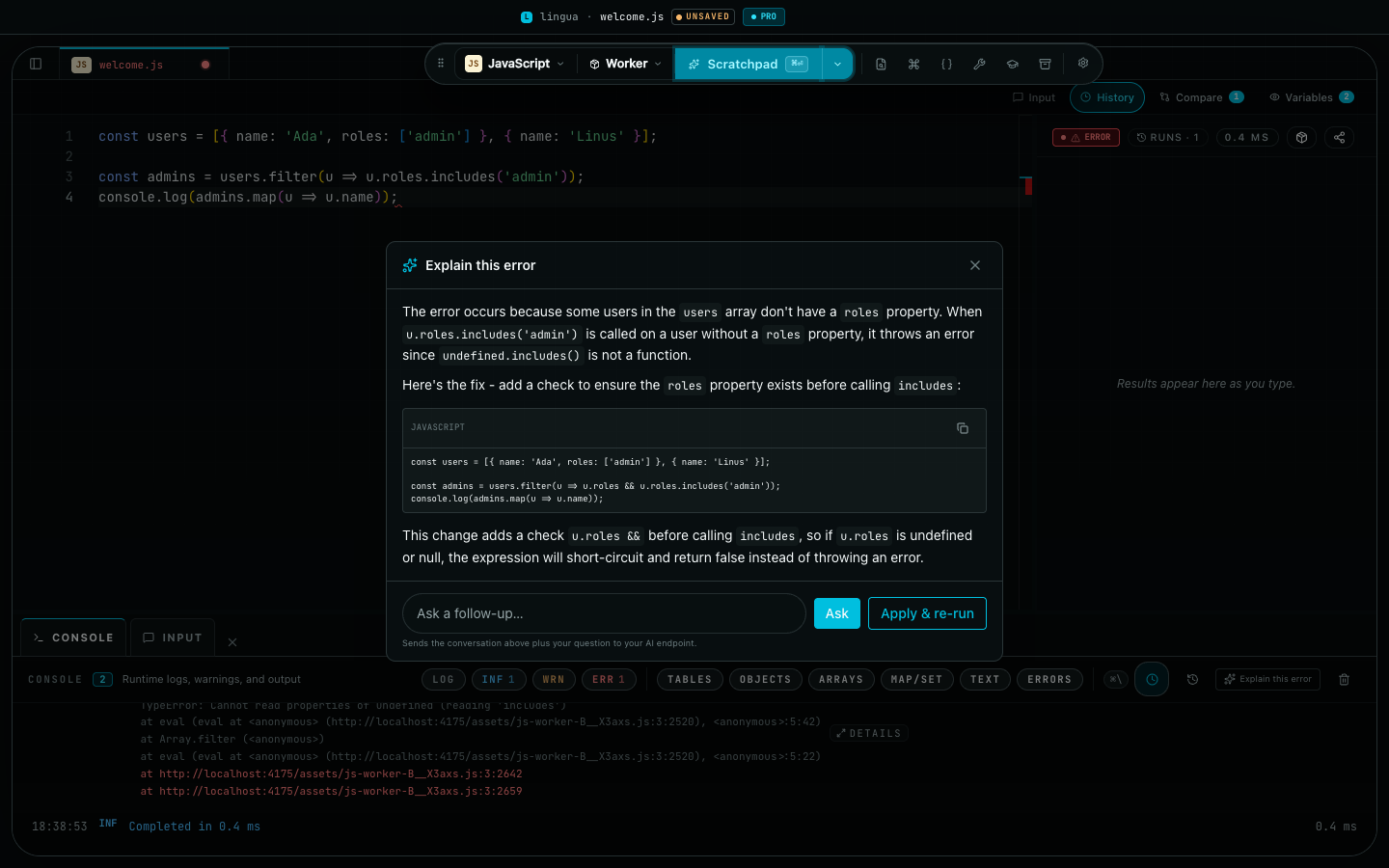
Explain-this-error dialog over a failed JavaScript run: the model explains the undefined property, proposes a guarded fix in a code block, and offers Ask and Apply and re-run actions
A real answer from a local model — qwen3-coder on Ollama, no cloud round trip. The dialog previews the exact payload before anything is sent, and Apply & re-run patches the fix behind a diff you approve.

Explain this error

When a run fails — a notebook cell, the console, a SQL query, an HTTP request — one click explains what went wrong and streams a fix, aware of where your code actually ran. Ask follow-up questions in the same thread.

Apply & re-run

When the answer proposes a fix, apply it behind a full diff preview — replacing your code never happens blind — and Lingua re-runs it. Error → explain → apply → green.

Ask AI for SQL

Describe a query in plain English and get DuckDB SQL back. Only the live schema is sent — never your rows — and you review the query before it runs.

Local-first & private

A local model means code never leaves your device. Obvious secrets are redacted before the preview, and the key lives only in Settings — never in exports, capsules, share links, or telemetry.

Inside the app

The actual product, doing actual work.

No mockups below — every frame is the shipping app captured mid-task on the production web build.
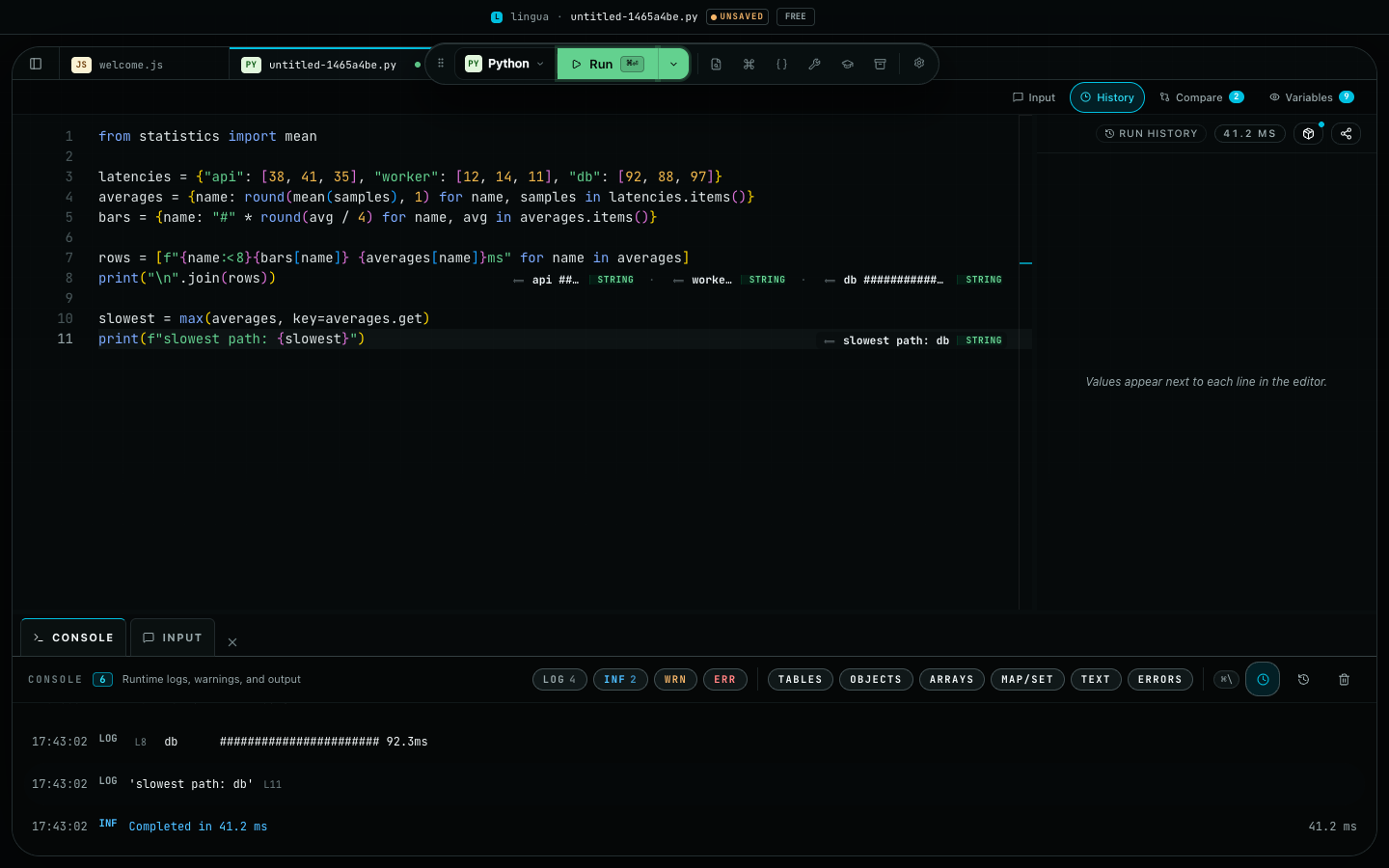
Lingua workspace running a Python script: inline values next to each statement and real stdout in the console panel

Run Python, watch values land on every line

Pyodide boots in a worker, stdout streams into the console, and each top-level statement shows its value inline next to the code. The wall-clock time of every run lands in the console too — timing is output, not a claim.
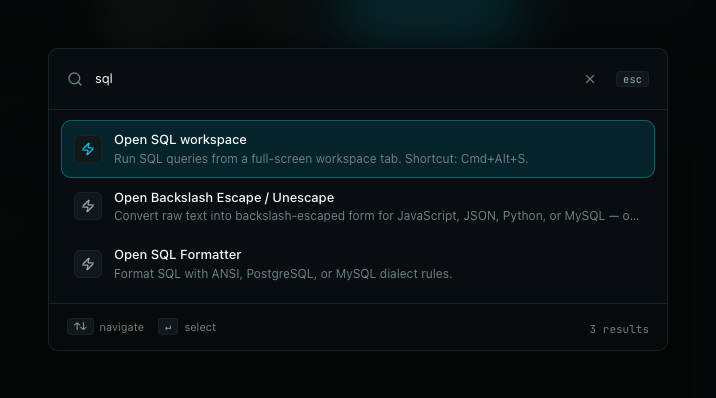
Command palette filtered by the query sql, showing the SQL workspace, escape tool, and SQL formatter

One palette for commands, templates, and utilities

Cmd+K searches everything at once — commands, snippets, templates, and every developer utility. Type three letters, hit Enter, keep coding.
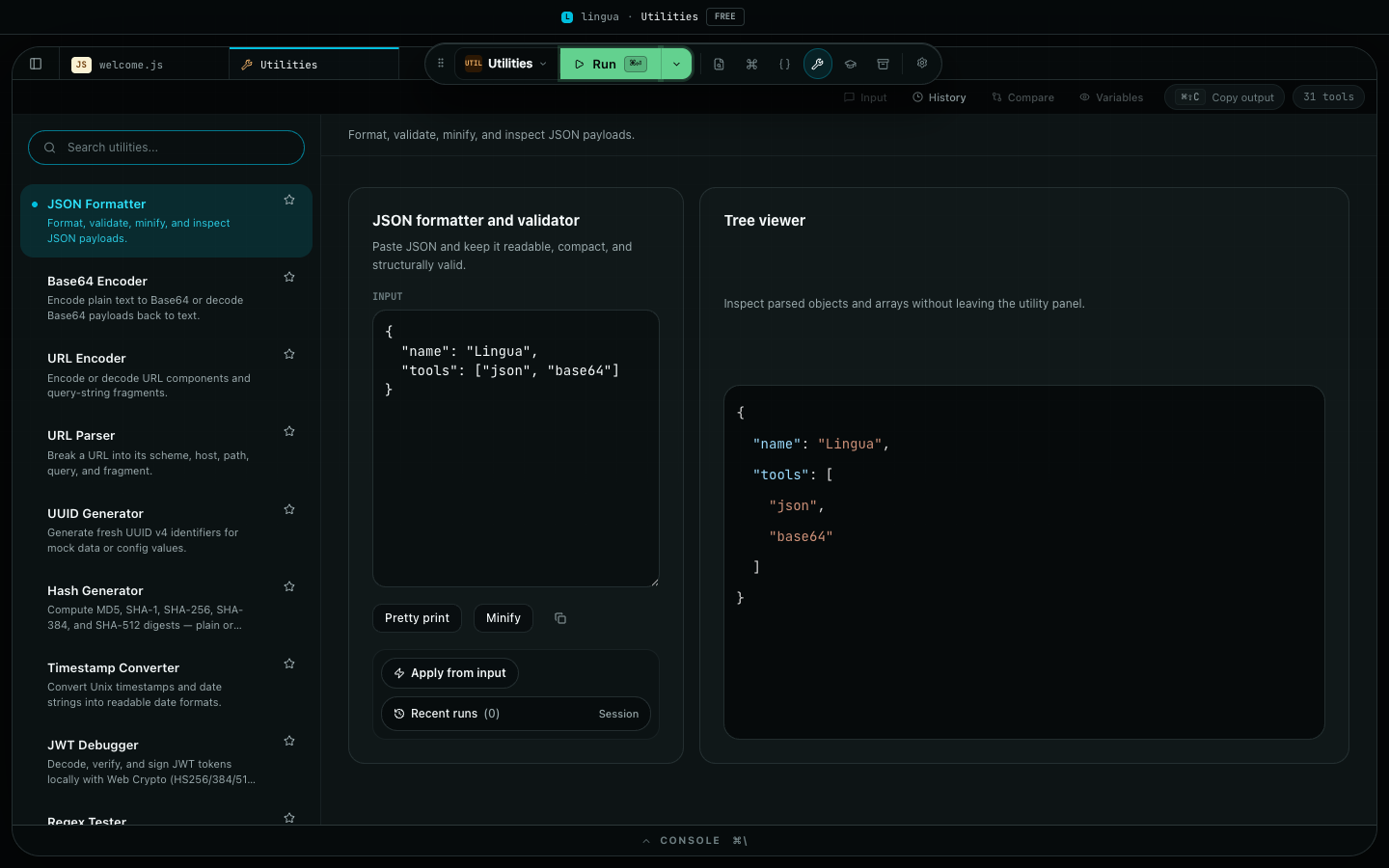
Developer utilities workspace with the JSON formatter active: input panel, pretty-print controls, and a tree viewer

31 utilities live next to your code

JSON formatter with a tree viewer, JWT debugger, mock data, hash and UUID generators — plus Utility Pipelines that chain them into one-click workflows. Each one runs locally in the same window, so quick tasks stop costing you a browser tab.
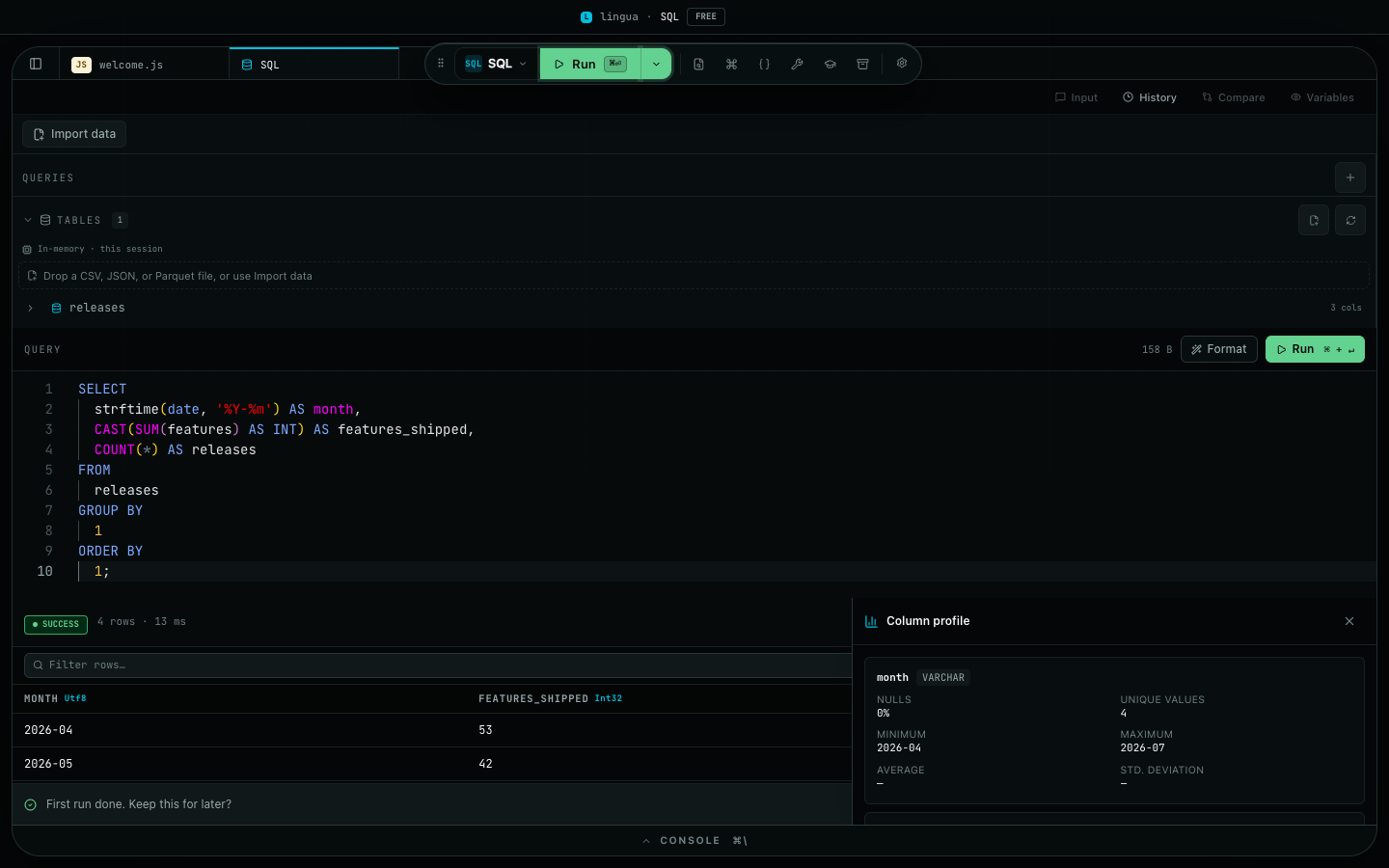
SQL workspace with an imported releases table, a formatted aggregate query, a results grid, and the column profile panel

A full SQL workspace on DuckDB

Drop a CSV, JSON, or Parquet file and it becomes a queryable table on the bundled DuckDB engine — results grid, one-keystroke query formatting, and per-column profiling included. Your local Run Ledger is queryable from here too.
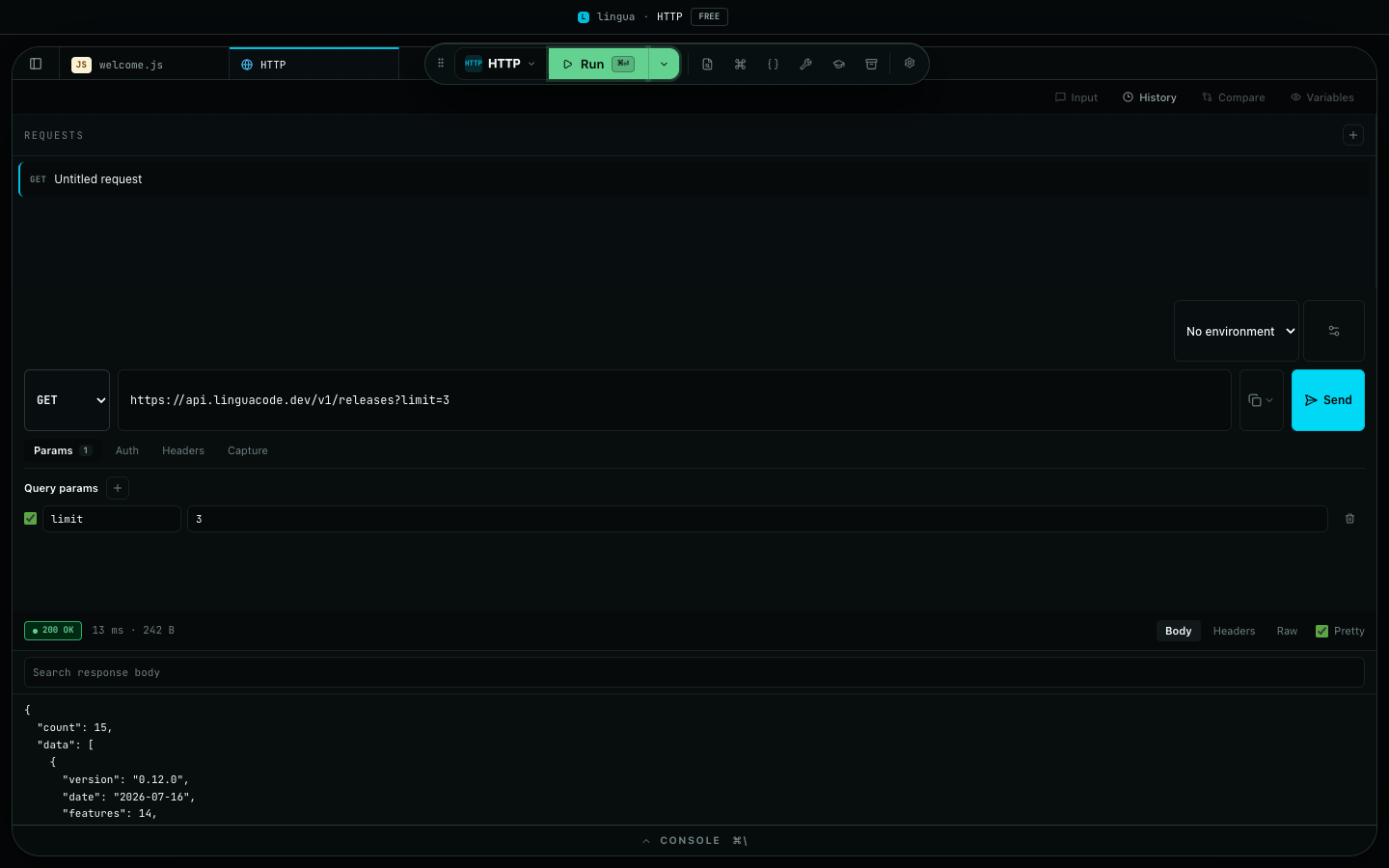
HTTP workspace showing a GET request with query params and a pretty-printed 200 OK JSON response

An HTTP client without the browser-tab tax

Requests, query params, auth, environments, and response capture live in one workspace tab. Send and read the pretty-printed body with status, timing, and size right where you code.

Privacy settings page: anonymous usage analytics off, Run Ledger off, sensitive HTTP header redaction list, and a redaction preview

Privacy is a settings page, not a promise

Telemetry ships off and stays off until you flip it. The Run Ledger records locally, sensitive headers are redacted by name, and the redaction preview shows exactly what would leave your machine — nothing.

Language matrix

Honest support across 12 languages.

Five languages execute today. Seven more are useful for opening, reading, and lint-adjacent workflows, but they are not runnable yet.

LanguageStatusRuntimeAccess
JavaScriptRunnableWorker runtimeFree
TypeScriptRunnableesbuild-wasm → WorkerFree
PythonRunnablePyodide v0.29.4 vendoredFree
GoRunnableLocal Go toolchainPro
RustRunnableLocal Rust toolchainPro
RubyView-onlyMonaco syntax viewAll tiers
JavaView-onlyMonaco syntax viewAll tiers
KotlinView-onlyMonaco syntax viewAll tiers
ScalaView-onlyMonaco syntax viewAll tiers
SwiftView-onlyMonaco syntax viewAll tiers
CView-onlyMonaco syntax viewAll tiers
C++View-onlyMonaco syntax viewAll tiers

Developer utilities

31 panels, built in.

The browser tabs that usually orbit a code runner — JSON formatter, regex, JWT, diff, hash, cron, color, the lot — already live inside Lingua.

Pricing

Four tiers, shown without the pricing-page ceremony.

The home page only needs the shape: Free is useful, Monthly unlocks the heavier runners, Pro is the pay-once tier, and Team is seat-based.

1Default

Free

$0

One tab, five snippets, JS / TS / Python / Ruby, single-shot utilities. No license needed.

2Subscription

Monthly

$5 / mo

Unlimited tabs and snippets, Go and Rust, plus utility workflows.

3Pay once

Pro

$59 once

Perpetual paid unlock — no recurring bill, with 12 months of updates included.

4Per seat

Team

$3 / seat / mo

Team seats, invoicing, and organization-friendly license handling.

Throw your next 10-line script at it.

One install. Five languages. No project to spin up.